

Introduction
The recently rereleased Cribl Edge Windows USID Pack fills an important gap in Windows Security Event monitoring: resolving Windows Security Identifiers (SIDs) to human-readable names. This means that instead of seeing GUID’s like abcd449-42a4-d357-337f-abcd12345678 in your logs, you’ll see something like HELMSDEEP\dennis morton!
This capability has long been an option (disabled by default) in the Splunk Universal Forwarder via the evt_resolve_ad_obj option, so it’s nice to now have this option in Cribl Edge as well.
Pack Overview
The Pack works by using the new Windows SID Lookup function in a pipeline configured to extract all SID’s via a RegEx into the field ResolvedSids:

The ResolvedSidsfield will look something like the following after the SID Lookup function – an array containing name-sid pairs.
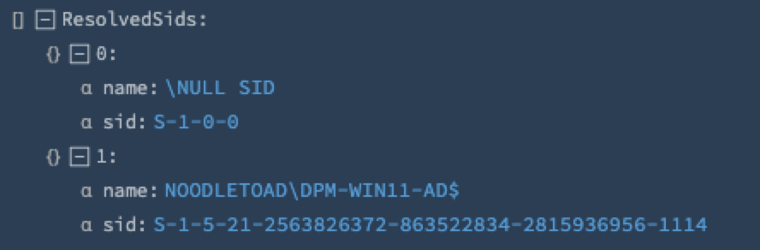
It then uses the following Code function to replace the SIDs in _raw with their resolved versions. In short, it loops through the ResolvedSid’s array and then performs a regex replace of SID->Resolved SID:
const sids = __e['ResolvedSids'];let raw = __e['_raw'];sids.forEach(item => { if(!('error' in item)) { const regex = new RegExp(item.sid, 'g'); raw = raw.replace(regex, item.name); }});__e['_raw'] = raw;
Line 5 is key – it skips items that returned any sort of “error”, such as below:

By default, the Pack leaves the ResolvedSidsfield in the event. Enabling the Splunk output option will remove it, however.
Basic Deployment
The Pack only supports Windows logs in XML format!
Deploying the Pack is straightforward:
- Navigate to the Fleet you want to install the Pack into and choose
More->Packs, clickAdd Pack->Add from Dispensary. Search for “Cribl Edge Windows USID” and then clickAdd Packin the upper right:

- From the Collect screen, select your Windows Event route, choose
Pack, select the “Cribl Edge Windows USID” Pack and then clickSave.

- Another option is to use the Pack as a pre-processing “pipeline” – this is especially useful if you already have a Pipeline or Pack that is processing Windows logs. See below for how to configure this option.
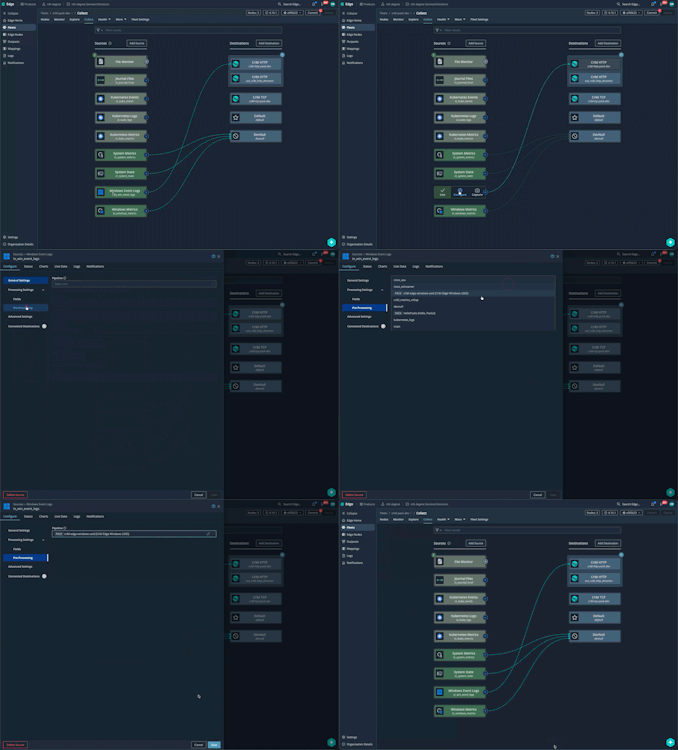
Once you perform a Commit/Deploy, the Pack will start resolving SID’s and substituting them into each event automatically.
SID Resolution Quality Metrics Option
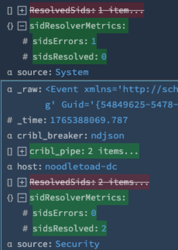
If you would like to report on successful vs errored SID resolutions, you can use the following Code function and Eval Function in a Stream Pipeline:
try{ let resolvedSids = __e['ResolvedSids']; let resolved = resolvedSids.reduce((count, entry) => { return ('error' in entry) ? count : count + 1; }, 0); let errors = resolvedSids.length - resolved; __e['sidsResolved'] = resolved; __e['sidsErrors'] = errors;}catch (err) { __e.CRIBLERR = String(err);}

The function yields this output:
Dennis Morton
Principal Consultant
dmorton@nthdegree.io